Describe it. Build it. Push it.
push8 turns a plain-English brief into a validated workflow and ships it straight to your own automation instance — no dragging, no proxy, real JSON.
- Write a sentence, get a working n8n workflow
- Plug in your own n8n — cloud or self-hosted
- We check it for missing keys and broken links
- Build AI agents with one prompt — model, memory & tools wired
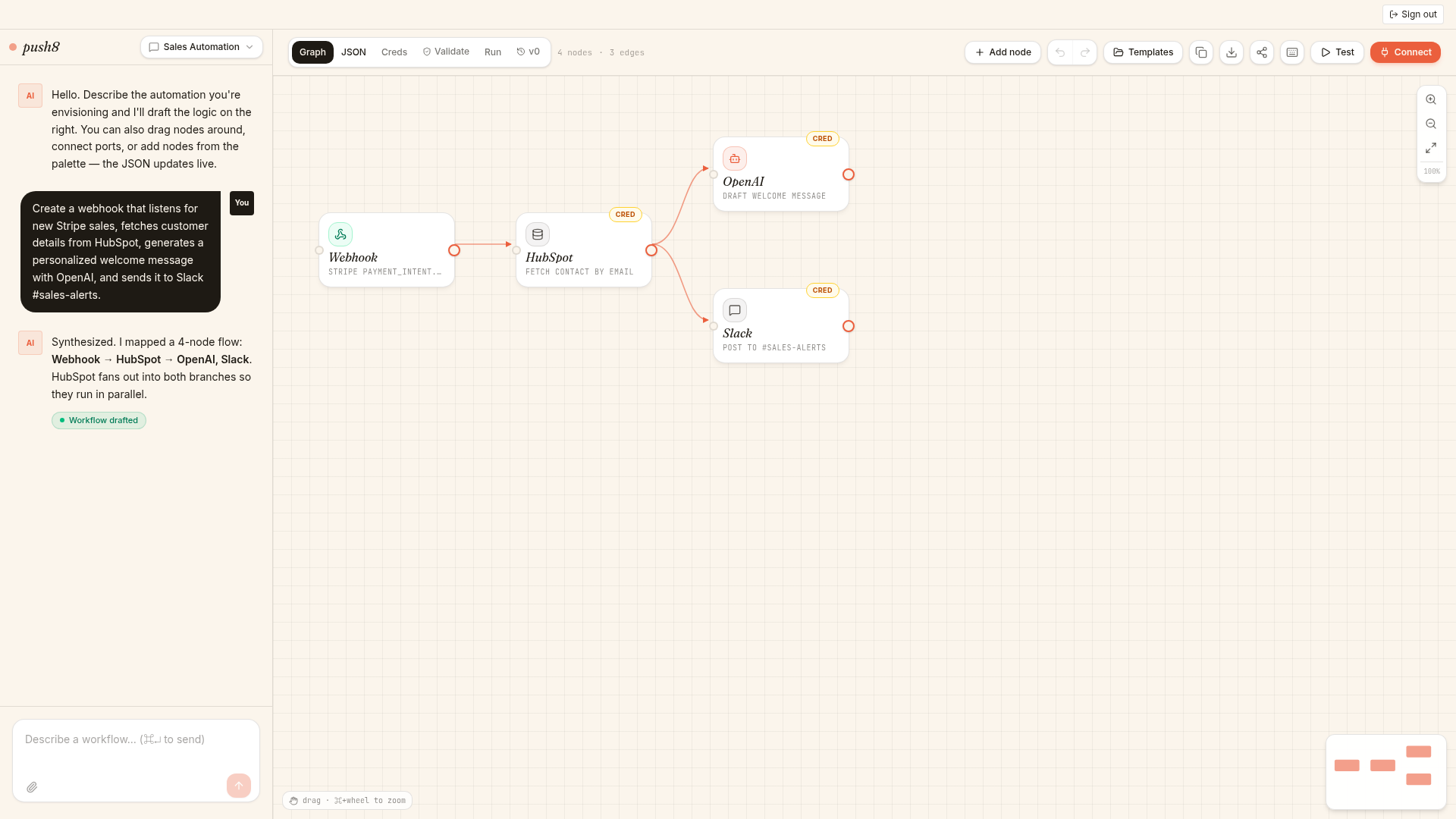
A real workflow drafted from one sentence — chat on the left, live graph on the right, importable JSON underneath.
Take a closer look
Three panels that do the heavy lifting — connect once, catch mistakes before they ship, and dry-run any node before you push.
Connect your n8n
Self-hosted or n8n Cloud. Saved to your account.
Validator
2 issues- OpenAIMissing credential openAiApi
- SlackChannel #sales-alerts not verified
- Webhook · HubSpotWired and ready
Test run
Running- Webhook · Stripe42ms
- HubSpot · fetch contact312ms
- OpenAI · draft welcome…
- Slack · post messagequeued
Connect → Validate → Push
Three steps, three panels. Click through to see what happens between writing a prompt and shipping a live workflow.
1. Connect your n8n
Paste your instance URL and an API key. We encrypt it and only use it server-side — your browser never sees the key after this.
Self-hosted or n8n Cloud both work. Keys live in your account, not in the workflow.
Connect your n8n
Encrypted at rest. Only the server holds the key — your browser never re-reads it.
Everything you need to ship automations
push8 is an AI-native studio that sits on top of your existing n8n stack — and soon Make and Zapier too. No lock-in, no proxy, your workflows live in your instance.
Prompt-driven authoring
Describe the automation. push8 drafts the nodes, wires the connections and picks the right triggers.
AI agents, fully wired
Ask for an AI agent and push8 attaches a chat model, memory and the tools it needs — not orphan nodes.
Validator before push
Catches missing credentials, broken edges and bad expressions before they hit your instance.
Bring your own stack
Self-hosted or cloud. We never proxy your data — push8 talks to your instance directly with your API key.
Snapshots & versions
Every workflow keeps a history. Restore an earlier draft with one click.
One-click push
Push a validated workflow to your instance as a brand-new automation, or update one you already own.
Questions, answered
The short version of what people ask before they push their first workflow.
What does the validator actually check?+
Structural correctness of the workflow: missing or unset credentials, broken edges between nodes, dangling triggers, invalid expressions, and required fields left blank. It runs continuously as you edit, so you never push a workflow that n8n will reject on import.
How does authentication work?+
You sign in to push8 with email/password or a magic link. Sessions live in your browser as an httpOnly token. To talk to n8n, you paste your instance URL and API key once — we encrypt it server-side and attach it only when you push or test. The key never leaves the server after that.
What does “save to your account” mean?+
Your n8n connection, chats, drafted workflows and version history are tied to your push8 account and only visible to you. Nothing is shared, indexed, or used to train models. Delete the connection any time from the Connect dialog and we wipe the encrypted key.
Do you proxy my workflow runs?+
No. push8 talks to your n8n instance directly using your API key — drafts and pushes go straight from our server to yours. We never sit in the request path of your live automations.
Self-hosted or n8n Cloud — does it matter?+
Both work the same. As long as your instance is reachable over HTTPS and you have an API key with workflow read/write permission, push8 can connect.
Where do I share feedback or report a bug?+
Hop into our Discord — the #feedback channel goes straight to the team. During the private beta that's the fastest path to get a fix in or a feature voted up.
Build with us in the open
Join our Discord for beta announcements, early-access drops, and a direct line to share feedback. Your input shapes what ships next.
Ready to build at the speed of thought?
Join the private beta — we approve a small batch every week.